Mico - Widget & Live Wallpaper
- 4.1
- Rating
- 10.00M
- Installs
- Free
- Price

 Analysis by App-foxy
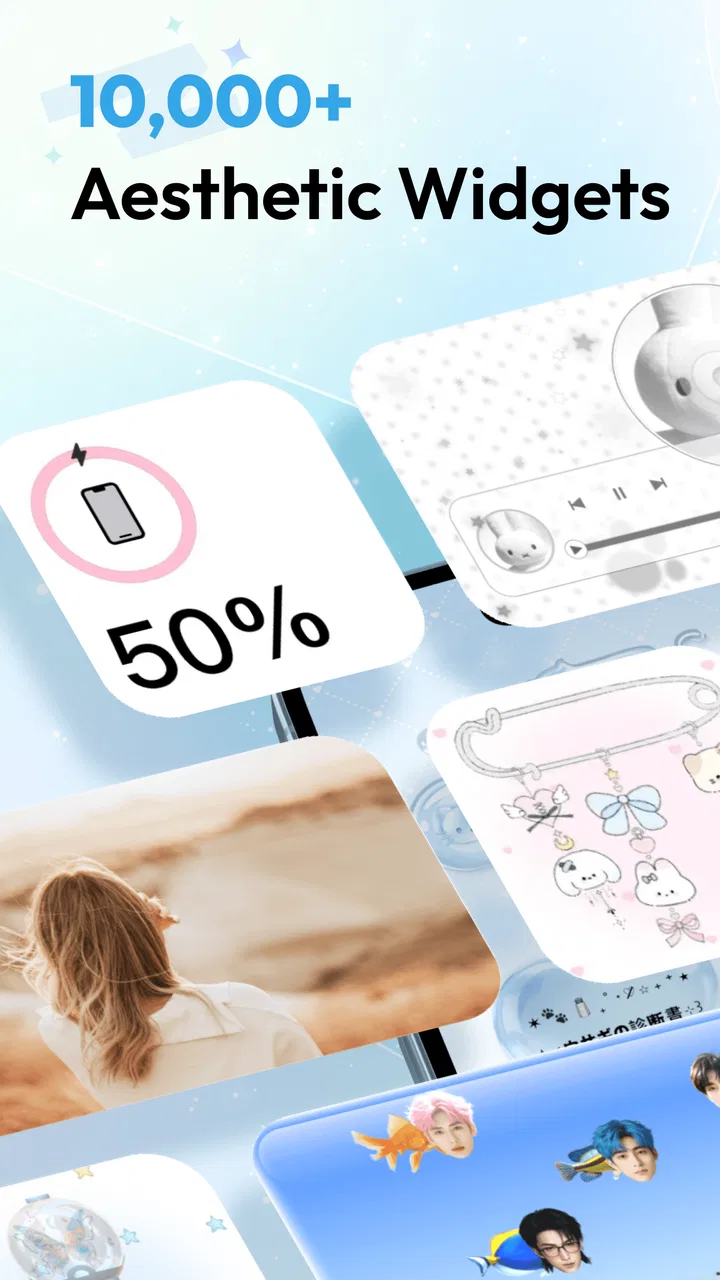
Changing a phone’s appearance usually starts with a wallpaper, but the home screen is made of more than one image. The icons, empty space, clock, and information blocks all affect how the device feels every time I unlock it. Mico - Widget & Live Wallpaper focuses on that complete visual layer, combining widgets, wallpapers, and themes for the home and lock screens in one personalization app.
I tested it with a simple goal: make my phone feel more personal without spending an evening hunting through separate wallpaper, icon, and widget apps. The result is appealing when I want a coordinated look quickly, especially when a static background feels too plain. It is also more limited than a full launcher replacement, so the right expectations matter. Mico is best understood as a visual customization tool, not a complete redesign of how Android works.
Why the widget-and-wallpaper combination matters
The strongest idea here is the connection between the background and the information placed over it. A wallpaper can look beautiful on its own and still be awkward once app icons, a clock, and notification details cover the important parts. Mico’s focus on widgets and wallpapers encourages me to treat the screen as one composition instead of collecting unrelated pieces.
You May Also Like

 Blood Strike: 2.5 Anniversary
Blood Strike’s Loadouts Turn Every Drop Into a Tactical Gamble
A close look at Blood Strike’s custom loadouts: how fast access to signature weapons reshapes its battle royale rhythm, rewards preparation, and narrows the gap between fights.

 Pandora - Music & Podcasts
Pandora’s Music Is Easy to Start, but Harder to Recover
Pandora’s strength is its low-effort path from a seed to a station. Its weak spot is how much confidence it asks you to place in connection, setup, and quiet recovery.

 8 Ball Pool
 Is Built on Rivalries, Rematches, and Routine
A close look at the rivalries, rematches, shared routines, and unanswered safety questions that turn a quick pool match into a persistent mobile community.

 Samsung Music
’s Quiet Strength Is Playing What You Already Own
Its reach comes less from spectacle than from dependable access to a personal library. That simplicity is both the app’s strongest retention engine and its ceiling.

 AccuWeather: Weather Radar
AccuWeather Review: A Quick, Clear Forecast for Everyday Decisions
For everyday plans, the best forecast is the one you can understand quickly. AccuWeather makes rain timing, radar, and local conditions easy to act on, with a few trade-offs.

 Hill Climb Racing
Why Hill Climb Racing Still Turns Crashes Into One More Run
A tiny car, a bumpy hill and one more upgrade: Hill Climb Racing keeps resurfacing because its simple chaos makes every near-miss feel personal.
More From Our News Desk
View All News


That difference is easy to notice in daily use. A pale background with a bright widget may look attractive in a preview but become hard to read outdoors. A very detailed image can also compete with icons. When the visual elements are selected as a group, the phone feels less like a collection of downloaded assets and more like a deliberate layout.
The app belongs to the personalization category and is developed by MICO LTD. It is free to install, with optional in-app purchases ranging from $0.49 to $19.99 per item. That makes it accessible for experimenting, although anyone who wants every premium-looking option should approach the catalog with a budget in mind rather than assuming the entire experience is included at no cost.
Its public reception is encouraging: Mico holds a 4.5 average from around 160 thousand ratings and has passed 10 million installs. Those figures suggest that the idea has reached a substantial audience, but they do not replace personal testing. Visual apps are especially subjective; a style that feels calm to me may seem too decorative to someone who prefers a clean, system-default screen.
A more complete visual reset than a single wallpaper
What I like most is the chance to refresh several parts of the phone at once. A wallpaper-only app solves the background, but the rest of the screen can still look unchanged. A widget-only app may add useful information while leaving the overall mood disconnected. Mico sits between those approaches by making the screen’s appearance the main project.
This is useful when I want a seasonal change, a softer color palette, or a more expressive lock screen without rebuilding the phone from scratch. I can begin with the image that sets the mood, then judge whether the widgets support it. That order is more practical than choosing a widget first and forcing the rest of the screen to accommodate it.
There is also a psychological benefit. A small visual change can make a familiar device feel fresh without changing the apps I use or the way I communicate. I would not call that a productivity feature, but it matters when the default interface has started to feel dull.
How I approach the first setup
I recommend starting with one screen rather than trying to redesign everything immediately. I choose the home screen or lock screen that bothers me most, apply a visual direction, and then check the result with the phone in ordinary lighting. Preview images are often more flattering than a real screen filled with icons and notifications.
The most useful habit is to inspect the empty areas before placing anything. A busy image needs room for text and icons, while a minimal image can tolerate a larger widget. If I ignore that relationship, the result looks crowded even when each individual element is attractive.
I also check readability before judging style. The first few seconds after installation are tempting: I want to pick the most dramatic image and move on. In practice, a quieter background with clear contrast is easier to live with. A lock screen should let me read the time immediately, and a home screen should make app names easy to find. Decoration is successful only when it does not interfere with those basic actions.
Because the app combines several visual choices, it is worth making one change at a time. I first settle on the wallpaper, then add a widget, then decide whether the icons and remaining space still feel balanced. This prevents a common problem with customization apps: changing so many elements together that I cannot tell which choice made the screen worse.
What the widgets add beyond decoration
Widgets are more than ornaments because they occupy space that I normally use to reach apps. A well-placed one can make a screen feel intentional, but it also changes the rhythm of navigation. If the widget is too large, it pushes frequently used apps lower. If it is too small, it may look like an isolated sticker rather than part of the design.
My practical advice is to reserve widgets for information I genuinely want to see without opening an app. A decorative block can be worthwhile when the goal is purely visual, but it should not take over the screen if quick access matters more. This is where Mico works best for people who enjoy balancing appearance and convenience rather than maximizing the number of elements.
Another useful approach is to create a visual anchor. I place one prominent widget in a predictable area and keep the rest of the screen quieter. That gives the eye somewhere to settle and leaves enough open space for icons. Filling every available area may look impressive in a preview, but it becomes tiring when repeated every time I unlock the phone.
Live wallpaper in an everyday routine
A live wallpaper can make the phone feel more alive than a still image, particularly when I unlock it many times during the day. The movement is most effective when it is subtle. If the animation is too attention-grabbing, it competes with the task I opened the phone to complete.
I see this capability as a mood feature rather than a reason to choose Mico for everyone. Someone who wants a calm, nearly invisible background may prefer a static image. Someone who enjoys a more expressive device can appreciate the extra motion. The important trade-off is that animation changes the character of the phone continuously, so the novelty may wear off faster than it does with a carefully chosen still wallpaper.
I would also test a live option during a normal day before committing to it. The relevant question is not whether it looks impressive for a minute, but whether it remains comfortable while checking messages, reading a notification, or opening an app. A beautiful animation that distracts from text is a poor everyday choice, even if it makes a strong first impression.
The best scenario: a coordinated personal refresh
The clearest use case for me is a phone that feels visually stale but does not need a functional overhaul. Imagine returning from a trip with a favorite color or atmosphere in mind. Instead of searching separately for a matching background and widget, I can use Mico to build a screen around that feeling. I might choose a restrained image, add one information widget, and leave enough open space for familiar app icons.
This also works for a shared household situation where one person wants a more expressive phone without changing the device’s underlying behavior. The apps remain where they are, while the visual layer becomes more personal. That is less disruptive than installing a new launcher and relearning gestures or app placement.
Another realistic scenario is preparing a lock screen that is easier to recognize at a glance. I can use a distinct visual style for the lock screen and a calmer arrangement for the home screen. The benefit is not just attractiveness; the two screens can serve different purposes. The lock screen can make the phone feel welcoming, while the home screen remains practical.
For someone who takes a lot of screenshots, a coordinated theme can also make the device feel more consistent in personal notes or social posts. I would not choose a design solely for that reason, but it is a pleasant side effect of treating the interface as a visual space rather than a background image.
Where the experience becomes less convincing
The main limitation is that visual customization does not automatically equal deep system customization. Mico can influence the appearance of the home and lock screens, but it is not a substitute for a launcher when I want detailed control over gestures, app drawers, icon behavior, or navigation structure. Users searching for a complete interface replacement may find the experience too focused on presentation.
There is also a curation trade-off. A large visual catalog can make choosing harder, not easier. I can spend more time comparing similar designs than actually using the phone. My solution is to decide on a mood and a practical requirement first: dark or light, quiet or animated, information-heavy or minimal. That filter makes the selection process less tiring.
Free access is another point to consider. The app costs nothing to install, but optional purchases are part of the experience. I would explore the available free material before deciding whether a paid item genuinely improves the screen. A design is not automatically better because it is locked behind a purchase, and paying for several small visual additions can add up.
Readability is a recurring weakness of this entire category, and Mico cannot remove that basic design problem. A wallpaper that looks excellent in a store preview may clash with a particular phone’s icon labels or text placement. I treat every preview as a starting point, not a guarantee. The final judgment should happen on the actual device, with normal brightness and the apps I use most.
Compatibility can also feel different from one phone to another. Android versions, screen proportions, and manufacturer interfaces affect how a home or lock screen appears. Mico supports Android 6.0 and later, which makes it available to a wide range of devices, but broad support does not mean every phone will present a design identically. I would leave time to adjust the arrangement after applying a theme.
Who benefits most from Mico?
I think the app is a strong fit for people who want a noticeable visual change with a relatively gentle learning curve. It suits users who enjoy matching colors, refreshing their lock screen, and adding a widget without committing to a new launcher. It is especially appealing if the phone feels boring but the current arrangement of apps already works well.
It can also suit someone who wants a gift-like refresh for an older device. Since it supports Android 6.0 and later, it is not limited to only the newest phones. The effect will depend on the device, of course, but a new visual layer can make familiar hardware feel more enjoyable without changing its core functions.
I would be more cautious if battery life is your top concern, if you dislike animated backgrounds, or if you want a completely minimal interface. In those cases, a single carefully selected static wallpaper or a lightweight system option may be a better match. Users who need advanced layout control should investigate a dedicated launcher instead of expecting a personalization catalog to provide that depth.
People who regularly change their phone’s appearance will probably get the most value because the app supports experimentation. The free entry point makes it easy to try a new direction, while the optional purchases leave room for users who want to spend on particular designs. Those who choose one wallpaper every few years may find the broader collection unnecessary.
Practical questions before installing
If you are wondering whether it is genuinely free, the answer is yes in the sense that the app is free to install. It also includes optional in-app purchases priced from $0.49 to $19.99 per item, so I would treat paid designs as extras rather than assume every visual choice is included.
If you are concerned about age suitability, the app is rated Everyone. That makes it a broadly accessible personalization option, although parents should still use their normal judgment about purchases on a shared device.
For Android compatibility, the minimum requirement is Android 6.0. The current version is 1.52.1, so I would update the app when an update is available and then recheck the screen if the layout looks different afterward. Personalization apps are judged by appearance, and even a small change can affect spacing or readability.
If you are choosing between Mico and a regular wallpaper app, I would pick Mico when the widget-and-wallpaper relationship matters. A standard wallpaper app is simpler and may be preferable when I only want a background with no additional visual decisions. If I want system-level behavior changes, I would choose a launcher instead.
Finally, if you are unsure whether the style will remain comfortable, begin with the least dramatic option available and live with it for a day. This is a better test than judging a design during the excitement of setup. If the screen still feels clear and pleasant after repeated unlocking, then the customization has earned its place.
My final take
Mico works because it treats the phone’s appearance as a connected composition. Its most valuable capability is not any single wallpaper or widget, but the ability to coordinate the visual mood of the home and lock screens. In my experience, that makes a bigger difference than replacing a background alone, especially when I keep the layout restrained and check readability carefully.
The app is not the right answer for deep launcher customization, extreme minimalism, or anyone who wants to avoid optional purchases entirely. It is also worth remembering that live wallpaper is a preference, not an automatic improvement. Still, for a free personalization app from MICO LTD with a 4.5 average and more than 10 million installs, it offers a convincing way to make a familiar Android phone feel more like my own.
I recommend trying it if your goal is a coordinated visual refresh rather than a complete operating-system makeover. Start with one screen, choose practicality before decoration, and use widgets as purposeful anchors instead of filling every space. Done that way, Mico - Widget & Live Wallpaper feels less like a catalog of attractive images and more like a practical tool for giving an everyday phone a new personality.
FAQs for Mico - Widget & Live Wallpaper
01What is Mico - Widget & Live Wallpaper, and how does it work?
Mico - Widget & Live Wallpaper is an app designed to enhance your device's home screen by providing a variety of customizable widgets and dynamic live wallpapers. Users can personalize their screens with interactive elements that update in real-time, offering both aesthetic appeal and functional utility. The app integrates smoothly with both Android and iOS systems, ensuring a seamless user experience.
02How do I customize widgets and live wallpapers in Mico?
Customizing widgets and live wallpapers in Mico is straightforward. After downloading the app, you can select from a range of templates and designs. The app offers intuitive controls for adjusting size, color, and content, allowing you to create a personalized interface. Users can also set live wallpapers that adapt to time of day or user activity, adding a dynamic touch to their device.
03Is Mico - Widget & Live Wallpaper free to use?
Mico offers a basic version that is free to download, providing access to a limited selection of widgets and wallpapers. For users seeking more advanced features and exclusive designs, Mico offers a premium subscription. This paid version unlocks a wider array of customization options and removes ads, creating an uninterrupted user experience.
04Does Mico affect my device’s performance or battery life?
Mico is optimized to minimize impact on device performance and battery life. While live wallpapers and widgets inherently use some resources, Mico employs efficient coding techniques to ensure that the app runs smoothly. Users can manage settings to further optimize performance, such as reducing update frequency or selecting less resource-intensive designs.
05What should I do if I encounter issues with Mico?
If you experience any issues with Mico, the app provides a comprehensive support section within its settings. You can find troubleshooting guides and FAQs to resolve common problems. Additionally, Mico offers customer support via email or in-app messaging, ensuring that users receive timely assistance for more complex issues.
Pros
- Highly customizable widgets for personalization.
- Smooth and intuitive user interface.
- Wide variety of live wallpaper options.
- Regular updates with new features.
- Low battery consumption with optimized settings.
Cons
- Limited free options; premium required for more.
- Occasional bugs in widget configuration.
- Live wallpapers may drain older devices.
- Ads can be intrusive in free version.
- Requires a stable internet for updates.

Mico - Widget & Live Wallpaper
Gallery